

The Python Apps That Actually Teach You to Code Instead of Just Tapping Multiple-Choice Answers
Python has become one of the most practical skills people can learn in 2026.
It powers automation, AI workflows, data analysis, web applications, cybersecurity tools, and countless beginner programming projects. Naturally, mobile app stores are now flooded with “Learn Python Fast” apps promising coding mastery in just a few minutes per day.
The problem is that many of them barely teach real programming.
Some apps feel more like Duolingo-style trivia games than coding education. Others focus so heavily on streaks and gamification that users finish dozens of lessons without ever writing meaningful code independently.
After testing the major Python-learning apps currently active on the US Apple App Store and Google Play Store, one thing became very obvious: the best mobile coding apps are not the ones with the flashiest marketing. They are the ones that gradually push users from passive tapping into actual coding logic and problem-solving.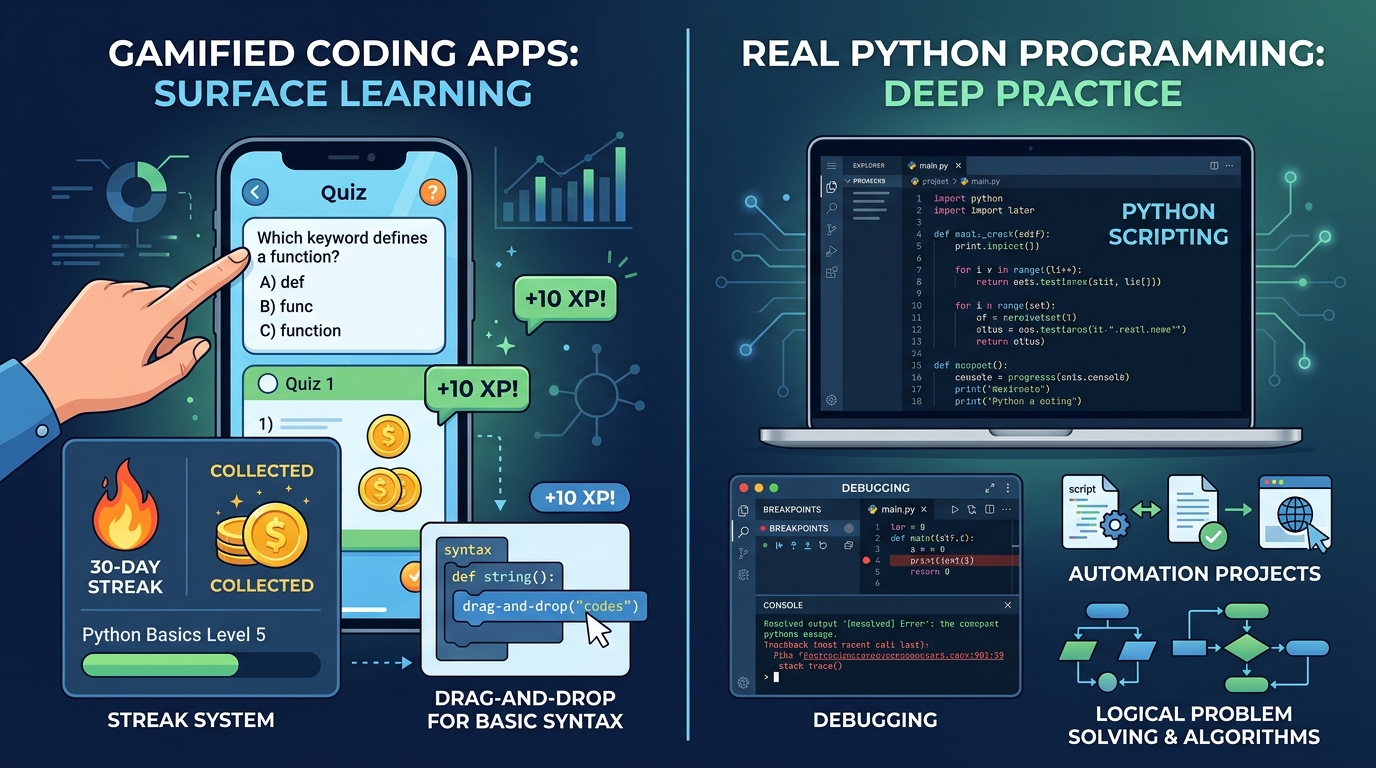
For this guide, the testing focused specifically on apps capable of teaching real beginner Python skills directly from a phone.
The evaluation criteria included:
Quality of Python curriculum
Amount of real coding practice
Mobile usability
Lesson structure and pacing
Long-term learning depth
Pricing transparency
Whether the app genuinely encourages writing code
These were the apps that genuinely stood out.
Mimo (iOS & Android)
The Reality Check: The Best Overall Beginner Experience on Mobile
Mimo consistently delivered the smoothest and most beginner-friendly Python learning experience during testing.
The app clearly understands its target audience: people learning coding in short bursts during commutes, lunch breaks, or downtime. Lessons are short, visually polished, and intentionally designed to reduce intimidation for complete beginners. Multiple 2026 comparisons still rank Mimo among the strongest mobile-first coding apps for beginners.
During testing, the pacing felt especially strong.
Concepts like variables, loops, functions, conditionals, and lists were introduced gradually without overwhelming users with massive theory dumps. The app also includes a built-in mobile code editor, which immediately made it feel more practical than pure quiz apps.
Another major advantage is consistency.
Several Reddit users specifically mentioned that Mimo works well for building a daily learning habit because the lessons are approachable enough to replace casual scrolling habits.
However, the limitations become clearer over time.
While Mimo is excellent for fundamentals, advanced learners may eventually feel constrained by the heavily guided lesson structure. Multiple discussions also criticized the free tier for becoming restrictive quickly.
The app offers a limited free version, while Mimo Pro generally costs around $9.99 monthly depending on promotions and annual plans.
Pros
Extremely beginner-friendly
Excellent mobile interface
Strong lesson pacing
Built-in coding editor
Great for daily habit building
Cons
Free version is heavily limited
Advanced depth is limited
Some exercises feel overly guided
Sololearn (iOS & Android)
The Reality Check: The Best Free Option for Casual Python Practice
Sololearn consistently felt more flexible and community-driven than Mimo.
While the interface is less polished overall, the app compensates with broader language support, larger community interaction, and a surprisingly generous free tier. Multiple recent comparisons continue recommending Sololearn for learners who want to explore Python without immediately paying for subscriptions.
During testing, one feature stood out immediately: community code sharing.
Users can browse solutions from other learners, participate in coding discussions, and compare approaches to programming problems. That collaborative aspect makes the learning process feel less isolated than many competitors.
The Python exercises themselves were also stronger than expected.
Rather than relying entirely on multiple-choice questions, Sololearn encourages more direct coding input and experimentation. Several Reddit discussions specifically praised the platform for offering better free Python practice than heavily paywalled alternatives.
However, consistency remains an issue.
The curriculum occasionally feels fragmented, jumping between concepts without the structured flow that makes Mimo easier for absolute beginners. Ads and upselling inside the free version can also become distracting.
The core app remains free, while Sololearn Pro generally costs around $9.99 monthly depending on billing structure.
Pros
Strong free tier
Active coding community
Better real coding exercises
Multiple language options
Useful community solutions
Cons
Less polished interface
Learning structure feels uneven
Ads can become annoying
Pythonista (iOS)
The Reality Check: The Closest Thing to a Real Python IDE on iPhone
Pythonista felt completely different from traditional “learn coding” apps because it is not primarily a lesson platform.
It is a genuine Python development environment for iOS.
During testing, this immediately made Pythonista more useful for intermediate learners who already understand some basics and want to write actual scripts on mobile devices. Multiple Reddit users still describe Pythonista as one of the strongest iOS Python environments available.
The app supports real Python execution, scripting, file handling, automation, and various built-in libraries. Instead of filling in missing code snippets, users can create functioning Python programs directly on their phones.
For learners trying to move beyond gamified exercises into genuine programming, this difference matters enormously.
However, Pythonista is absolutely not the best starting point for total beginners.
There is very little hand-holding, minimal structured curriculum, and almost no onboarding compared to Mimo or Sololearn. New programmers may feel lost quickly without external tutorials.
The app is also iOS-only and typically requires a one-time purchase rather than a subscription.
Pros
Real Python coding environment
Excellent for experimentation
Much deeper than quiz-based apps
Strong offline functionality
Ideal for intermediate learners
Cons
Weak beginner onboarding
No structured curriculum
iOS only
Less gamified motivation
Enki (iOS & Android)
The Reality Check: Best for Daily Micro-Learning and Reinforcement
Enki approaches coding education more like a technical habit-building platform than a traditional course app.
Instead of long guided modules, the app focuses on short daily lessons, coding concepts, quizzes, and spaced repetition. Multiple Reddit users still recommend Enki for maintaining programming consistency during busy schedules.
During testing, this worked surprisingly well for reinforcement learning.
The app excels at helping users retain syntax, terminology, and conceptual understanding through repetition. Short Python lessons covering loops, dictionaries, functions, and data structures were easy to complete during small breaks throughout the day.
The overall interface also feels cleaner and more professional than many overly gamified coding apps.
However, Enki struggles when it comes to larger hands-on projects.
It works best as a supplemental learning tool rather than a complete standalone Python education platform. Users seeking deep project-building experience will likely outgrow it eventually.
The app offers free access with optional premium subscriptions for expanded lessons and learning paths.
Pros
Excellent for daily reinforcement
Clean and professional interface
Good conceptual explanations
Strong habit-building structure
Less childish than competitors
Cons
Limited project-based learning
Not ideal as a standalone system
Less practical coding depth

PyDroid 3 (Android&iOS)
The Reality Check: The Most Serious Android Python Environment
PyDroid 3 felt like the Android equivalent of carrying a lightweight Python workstation inside a phone.
Unlike most educational apps, PyDroid focuses primarily on giving users a functioning Python environment capable of running real code. Multiple Reddit discussions continue recommending it for learners who want actual programming capability on Android devices.
During testing, the biggest advantage was freedom.
Users can install packages, experiment with scripts, run projects, and interact with Python more realistically than simplified lesson apps allow. For motivated learners, this creates substantially more authentic coding practice.
However, the experience is less polished educationally.
PyDroid does not guide users carefully through lessons or beginner progression. It works best alongside tutorials, courses, or YouTube instruction rather than as a self-contained learning platform.
Still, for Android users serious about practicing real Python code directly on mobile, few apps came close.
Pros
Real Python environment
Excellent Android flexibility
Supports actual coding projects
Strong package support
More authentic programming experience
Cons
Weak structured learning
Not beginner-friendly
Interface feels technical
The Final Verdict
For complete beginners trying to genuinely learn Python from a phone, Mimo stood out as the strongest overall app in 2026.
It consistently delivered the best balance of accessibility, coding practice, pacing, and long-term usability during testing. Most importantly, it lowered the intimidation barrier enough that users could realistically maintain a daily coding habit — which is where most beginner learning succeeds or fails.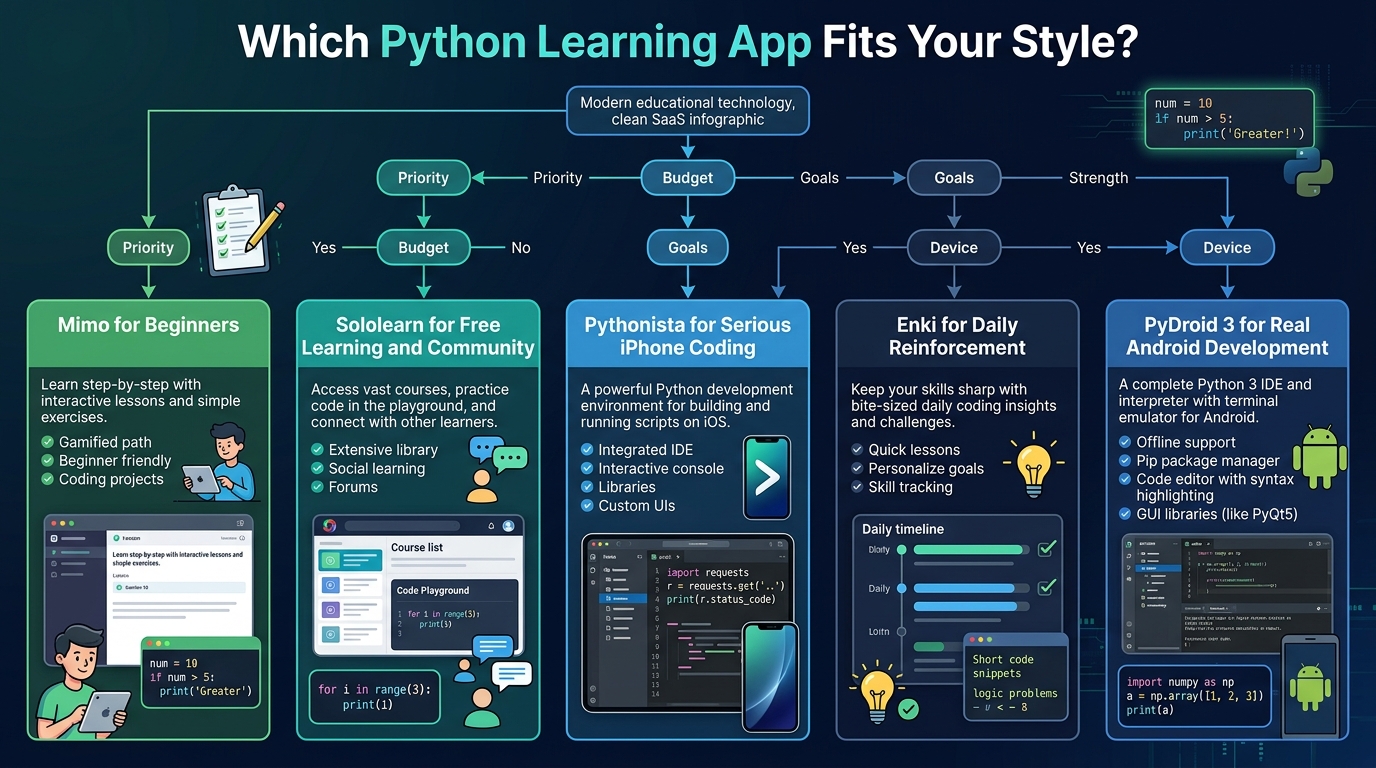
That said, the best app still depends heavily on learning style:
Choose Mimo for the best beginner-friendly experience.
Choose Sololearn for stronger free learning and community interaction.
Choose Pythonista for serious iPhone-based coding.
Choose Enki for daily reinforcement and habit building.
Choose PyDroid 3 for authentic Android Python development.
The biggest lesson from testing these apps is that mobile learning works best as a gateway into real coding practice — not as a replacement for it. The strongest apps are the ones that eventually push users beyond tapping answers and into building actual programs.





